Passes in Shenandoah Go App
On Monday, Oct. 19, the Shenandoah Go app will no longer display temporary passes.
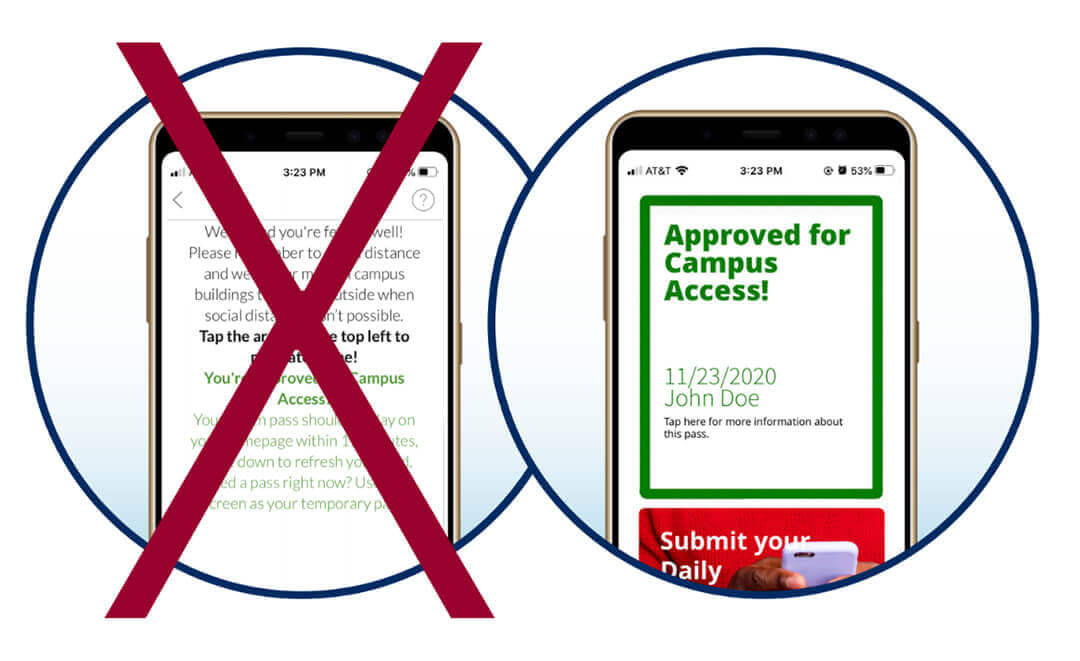
We appreciate everyone doing their part to adhere to the SU Pledge to Keep Shenandoah Safe by monitoring symptoms of COVID-19 and reporting these symptoms and tests in the Shenandoah Go app.
On Monday, Oct. 19, the Shenandoah Go app will no longer display temporary passes.
Currently, the temporary pass shows up after you complete your symptom check while you wait for your official pass to appear within 15 minutes. Everyone should be completing their check before arriving on campus. The change ensures that you are submitting your symptom check early in the morning and that you are assessing your health and temperature appropriately.
Pass-checking will be enforced at all locations — Main Campus and at the Health Professions Building; Scholar Plaza, Loudoun; the Inova Center for Personalized Health, Fairfax; and the Bowman and Feltner buildings. Mobile passes need to be shown to enter dining locations, classes, athletic practice, certain campus buildings, in-person events, and more.
If you are trying to access any of these locations before (or immediately after) you have completed your symptom check, you will not have a temporary pass to show and you will have to wait until your color-coded pass shows in the app.
Please allow at least 15 minutes for your color-coded pass to generate after you’ve completed your symptom check. Your pass may appear anywhere on the homescreen of your Shenandoah Go app. If you don’t see it at the top of your homescreen be sure to scroll to the bottom to find it. You may have to swipe down on your homescreen to refresh it for your pass to display.
If you don’t see your pass after 15 minutes, make sure you have completed your profile in the menu under tasks. Until you complete your profile, you will not get a pass.
Make sure you fill out your Shenandoah Go symptom check first thing every day.
If you experience problems, please message app support by clicking the question mark in the top right corner of your app.