

To provide our students with an education tailored to their passions, each college has unique curriculum costs.
View the tuition and fees for the degree level, year, and program of your choice.
Pay Your Tuition
View the tuition due dates and how to make payment.
View the current Academic Calendars.
Traditional Academic Calendar (15 Weeks)
Conservatory, Arts & Sciences, School of Business, Health Professions, Nursing and Pharmacy
- Fall Term: August 4
- January Term: December 15
- Spring Term: December 15
- Summer Term I
- College of Arts & Sciences, Conservatory, School of Business and School of Nursing Term – May 15
- Pharmacy/Health Professions Summer Term: May 21
- Summer Term II: June 15
8 Week Academic Calendar (15 Weeks)
Graduate 100% Asynchronous Online Programs
Fall A: —–
Fall B: October 6
Spring A: December 30
Spring B: March 3
Summer A: April 28
Summer B: June 23
Traditional Academic Calendar (15 Weeks)
Conservatory, Arts & Sciences, School of Business, Health Professions, Nursing and Pharmacy
Fall Term: August 5
January Term: December 15
Spring Term: December 15
Summer Term: May 20
Summer Term II: June 15
8 Week Academic Calendar (15 Weeks)
Graduate 100% Asynchronous Online Programs
Fall A: August 17
Fall B: October 12
Spring A: December 29
Spring B: February 22
Summer A: April 26
Summer B: June 21
View Your Account Statement and Make a Payment
Shenandoah University accepts all major credit cards. Electronic checks are accepted, online only.
There is a 1.5% surcharge on all credit and debit card payments. Electronic checks have a $3.00 fee per transaction when submitted online. There is no fee for paper checks.
If you will be mailing a check, be sure to provide the student’s full name and Shenandoah ID number with the check. Please mail payment to the following address:
Shenandoah University
Hornet Central
1460 University Drive
Winchester, VA 22601
- Login to Hornet Hub
- Your username and password are sent to you via email from the Admissions Office
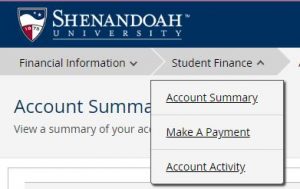
- Select “Student Finance” from top of page.
- Select “Make a Payment” from the drop down menu. You may not make a payment unless there is a current balance due.
- To view your student statement by term, select “Account Summary” from the drop down menu.
Students may grant Parent/Person Proxy access to a person(s) of their choice.
To grant Parent/Person Proxy access, the student must:
- Login to Hornet Hub
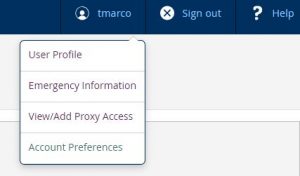
- Click on student’s name at the top right of page
- Choose View/Add Proxy Access from drop down menu
- Please note that you must enter the parent/person’s current/existing email address so the parent/person can receive his/her username and password.
Once a parent has been granted Parent/Proxy access, parent must:
- Login as a Parent/Person Proxy using your username and password
- Select the student name, not the parent/person name, from list on the Person Proxy page
- Select “Student Finance”
- Select “Make a Payment”
- For account statement by term, select “Account Summary”
Shenandoah offers families the option to divide their tuition bill into monthly payments per term.
The Shenandoah University payment plan is available to both undergraduate and graduate students who have been accepted into a degree seeking program at Shenandoah University.
100% Online Graduate Asynchronous 8 Week programs are excluded from payment plans.
Apply for a Shenandoah University Payment Plan.